


24/04/2017 – 30/04/2017
Final Year Project dissertation writing week
Semester 2 Blog
17/04/2017 – 25/04/2017
Final Year Project dissertation writing week
Each entry below represents a weekly task conducted for my Games Creation module, it is organized to be latest first and shows the progression of the Cyber Labyrinth VR Game.
10/04/2017 – 16/04/2017
Final Year Project dissertation writing week
03/04/2017 – 09/04/2017
Final Year Project dissertation writing week
03/04/2017 – 09/04/2017
Final Year Project dissertation writing week
27/03/2017 – 02/04/2017 (VR Game)
Below is the advanced A.I. which patrols and blows up when near the player. A snippet of the how the enemy destroys is also below.


When this enemy is in attack mode it calls the lookAtPlayer() function to change its rotation so it looks towards the player. Then it creates a playerOffset a position relative to the player’s in game position, the difference in this is slightly further away from the player (line 74). The nav agent’s destination is set to this newly calculated position so the nav agent travels very close towards the player (line 75) and doesn’t get too close to cause collide with the player and force the player backwards. When the distance between the nav agent and the playerOffset is less than 5 (when the nav agent is in a close range from the player) it calls the destroy corroutine. The destroy() function simply stops the nav agent (line 86), then uses its position to create the explosion (lines 90). The gameObject’s renderer is set to false so it can’t be seen when the explosion occurs. It waits for four seconds when the animation has completed then the gameObject is destroyed as it cannot be destroyed before as the animation will cut. Also health is taken away from the player by 30 every time this function is called to cause player damage.
Simple A.I. is changed below to include a animation where the arms appear when the enemy first sees the player.

The Attack() function has override as its used differently in this script and the SmartAIScript script. In this instance it calls the corroutine FireBullets(). This enemy initially shows the animation of its arms being formed initially then firing and it switching from firing bullets between the left and right arms based on the value of shootingPositionIndex which is assigned as the position the bullet will instantiate from (lines 101-104), when this is zero it changes to one (enemy’s right arm), when this is one it changes to zero (enemy’s left arm), the value changes from zero to one the IEnumator has waited for 1.5 seconds. The code here simply creates the bullets at the appropriate index position and travels towards the position of the player (line 104-107), by also adding force forward’s.
Both simple and advanced enemies now work accordingly.
20/03/2017 – 26/03/2017 (VR Game)
Beta feedback
-
Simple enemy is good needs to add the scanning effect
-
Simple enemy needs to have animation which shows arms coming out.
-
Need to add red glow in centre of simple enemy as last week’s one doesn’t work correctly by just changing emission value.
-
Need to now add advanced second enemy which explodes near player.
13/04/2017 – 19/04/2017 (VR Game)
Changing Simple A.I. To New Model
Fixing issues with enemy A.I. health, set them all up with new model all simple A.I. display text UI above enemies. Simple enemy is now working so at least one A.I. is working for next week beta test.
06/03/2017 – 12/03/2017 (VR Game)
Adding Deactivating Simple A.I.
When the simple enemy stops and notices the player it shoots bullets, this needs to be changed so the A.I can take in damage and then be deactivated for 5 seconds when the enemy is shot at by the player’s bullets. After 5 seconds it goes to the last state and continues accordingly. This is added using using the TextMesh component which displays the timer counting down from 5 seconds.
The Stop() function is called to make the enemy go into a disable mode. In which a while loop ensures the timer (set as 5 seconds) decrements, as this does it displays the time on the enemy and makes the box collider a trigger so the player can go through the enemy. This is the only way in which the player can pass this enemy by disabling it and walking through it. Lines 149-154 ensure the variables for the loop are reset.

Changing the texture on the A.I. it now glows by changing the emission value for each material to be greater than 1 as shown below.

27/02/2017 – 05/03/2017 (VR Game)
Fixing More Simple Enemy A.I.
Below is a screenshot showing the game view according to the player’s perspective. The green AdvancedFlyingJermaine is reference to advanced A.I.’s which goes towards player an blows up. SimpleFlyingJermaine is renference to simple A.I.’s which stop and shoot bullets at the player taking away health.
Feedback for A.I.
After getting feedback from Katie Goodman the A.I. needs to be modified to make sense in the VR World.
-
It can’t just walk around it needs some sort of lighting to be seen.
-
The simple enemy (SimpleFlyingJermaine) needs some sort of scanner so when it reaches end of waypoint it scans walls “looking for player”
-
Bullets for simple enemy (SimpleFlyingJermaine) need to fixed as they just fall off and don’t work in the game scene.

20/02/2017 – 26/02/2017 (VR Game)
Fixing More Simple Enemy A.I.
Below is a screenshot showing the game view according to the player’s perspective. The green AdvancedFlyingJermaine is reference to advanced A.I.’s which goes towards player an blows up. SimpleFlyingJermaine is renference to simple A.I.’s which stop and shoot bullets at the player taking away health.
13/02/2017 – 19/02/2017 (VR Game)
Added First A.I. Model
Changed A.I. model from cube to an enemy model made by artist. Added all possible waypoints the A.I. can go. As there two enemies which both use the Patrolling function a base class is created, two scripts one for simple walking around enemy (AIScript) and the for advanced enemy patrols and destroys at player (SmartAIScript). Both call Patrolling() function from EnemyBaseClass script to patrol around.
06/02/2017 – 12/02/2017 (VR Game)
Simple A.I. Shooting Behaviour
Linking simple A.I. to have shooting behaviour when it goes to Attack state, it can now shoot bullets at player. Communicating to player health script to take away damage when bullet hits enemy. Starting to work on advanced enemy A.I.
30/01/2017 – 05/02/2017 (VR Game)
Improving Simple A.I.
First test of A.I. shows it is can navigate around the walls patrolling towards a path and change state to Attack when the player is in a radius. However the player can be within the radius but is actually not in view of A.I. as there is a wall between them. A.I. is doing its job as it notices player, needs to be changed to take in consideration of walls.
23/01/2017 – 29/01/2017 (VR Game)
Improving Simple A.I.
First test of A.I. shows it is can navigate around the walls patrolling towards a path and change state to Attack when the player is in a radius. However the player can be within the radius but is actually not in view of A.I. as there is a wall between them. A.I. is doing its job as it notices player, needs to be changed to take in consideration of walls.

16/01/2017 – 22/01/2017 (VR Game)
Creating Walkable A.I.
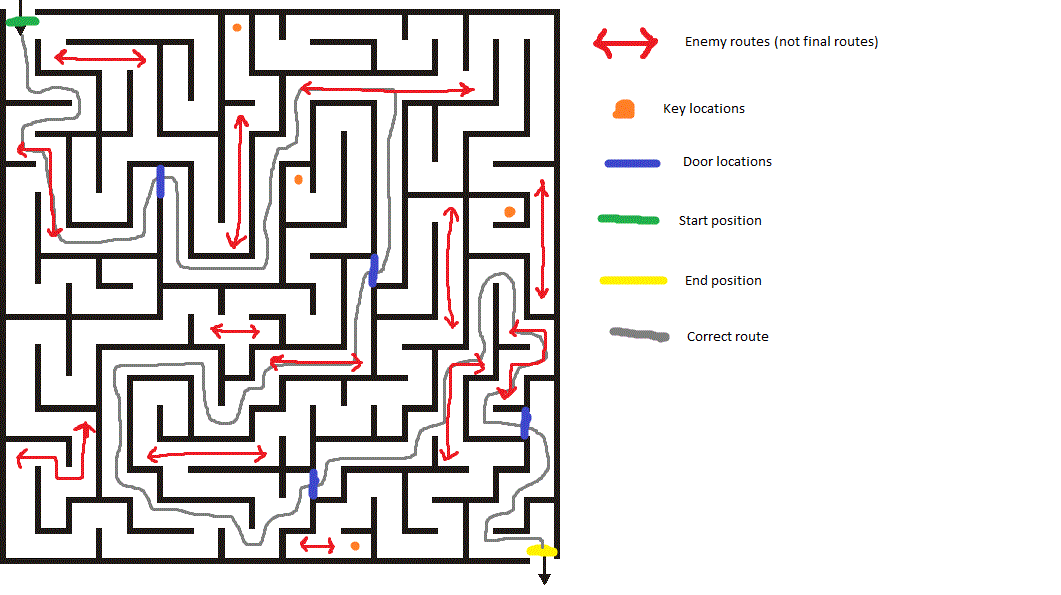
Right now a cube object is used to perform A.I. behaviour, enemy cube can move around using by using the NavMesh which accesses a simpleEnemy script. The enemy script is basic which has an enumerator which switches states from Attack and Chase. There are two enemies simple and advanced, below shows a map how they operate with red lines as routes. Focusing on simple enemy right now!
09/01/2017 – 15/01/2017 (VR Game)
New VR Game Idea
Developed group idea of VR Game, player is stuck in a maze and aims to his their way out whilst avoiding two different types of enemies (as a group still developing game idea and storyline). My task was to code the A.I. for the creating enemies, patrolling and shooting behaviour.
Development software: Unity3D,
Programming Language: C#
Platform: VR Game
Role: Junior Programmer